Hyper Mode: zero-delay alerting for high-stakes moments
Arm an auto-expiring window where detection runs fast and alerts skip every delay, in Triggered or Extra flavor, now or scheduled ahead.
Hyper Mode is a “break glass” window for the moments when going quiet must never go unnoticed: a solo trip, a risky commute, a launch day. While it is active, your device checks in every minute instead of every five, an outage is declared after about five minutes of silence, and your action plan fires immediately, with no check-in window. It overrides ghost mode, online hours, time away, sleep holds, and the meeting gate: while armed, silence always alerts.
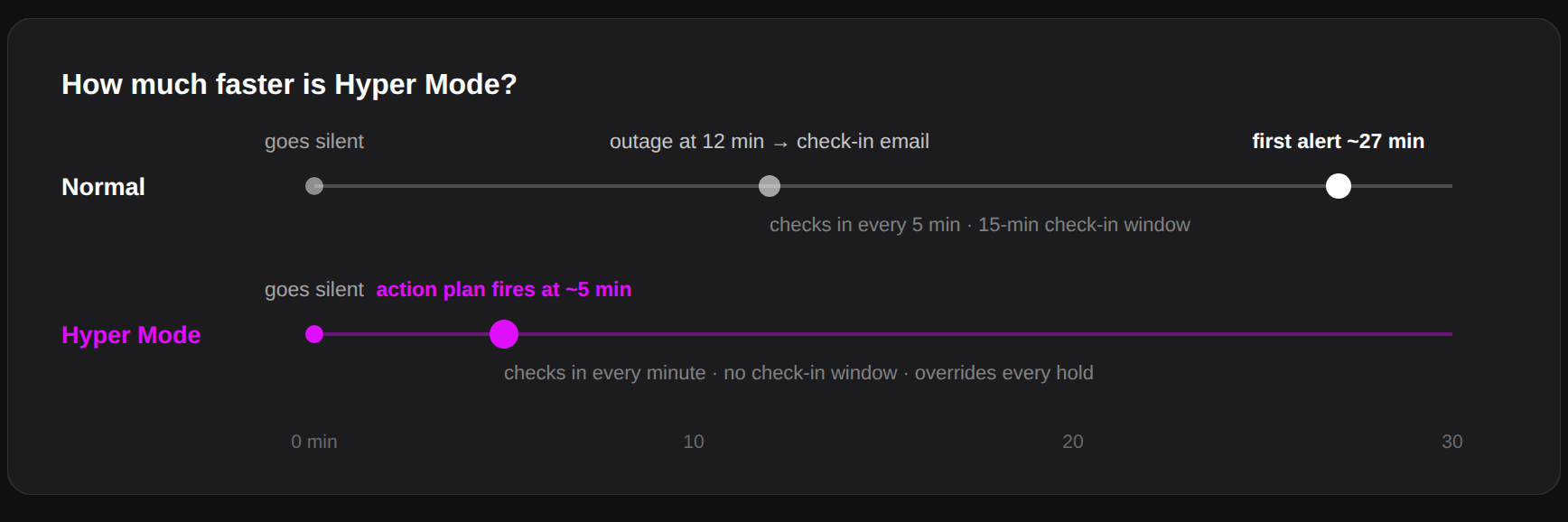
Two flavors, chosen when you arm it:
- Triggered: your normal action plan, at zero delay. Same messages, same recipients, just instant.
- Extra: first an immediate custom message to hand-picked contacts, then your normal action plan runs exactly as configured. Set the message and recipients when arming in the app; the agents reuse that saved setup.

Arming and disarming:
- Arm it from the Overview quick action or the agent’s menu, for 1 to 24 hours (default 4). It always expires on its own; you cannot forget it armed.
- Schedule it ahead: pick a future start (up to 30 days out) and a duration, and the window arms itself when the time comes.
- The menu bar icon shows fast-forward chevrons inside the bubble: solid while Hyper Mode is active, outline while a window is scheduled.
The honest tradeoff: zero delay means zero forgiveness. A dead battery or a closed lid during an armed window alerts your contacts within minutes. That is exactly what you asked it to do; arm it for the moments where that is the right answer.