Installing the agent (Mac, Windows, Linux)
Download the agent from Settings, then Devices. Mac needs a one-time Open Anyway approval; Windows may prompt SmartScreen; Linux runs as a systemd service.
The agent is a small background app that sends the 5-minute check-ins. Settings → Devices has downloads for all three platforms; enter a one-time enrollment code from Devices → Add a device when the agent first runs.
Mac
- In settings, open Devices and click Download for Mac.
- Unzip the download and drag proxigenta Agent to your Applications folder.
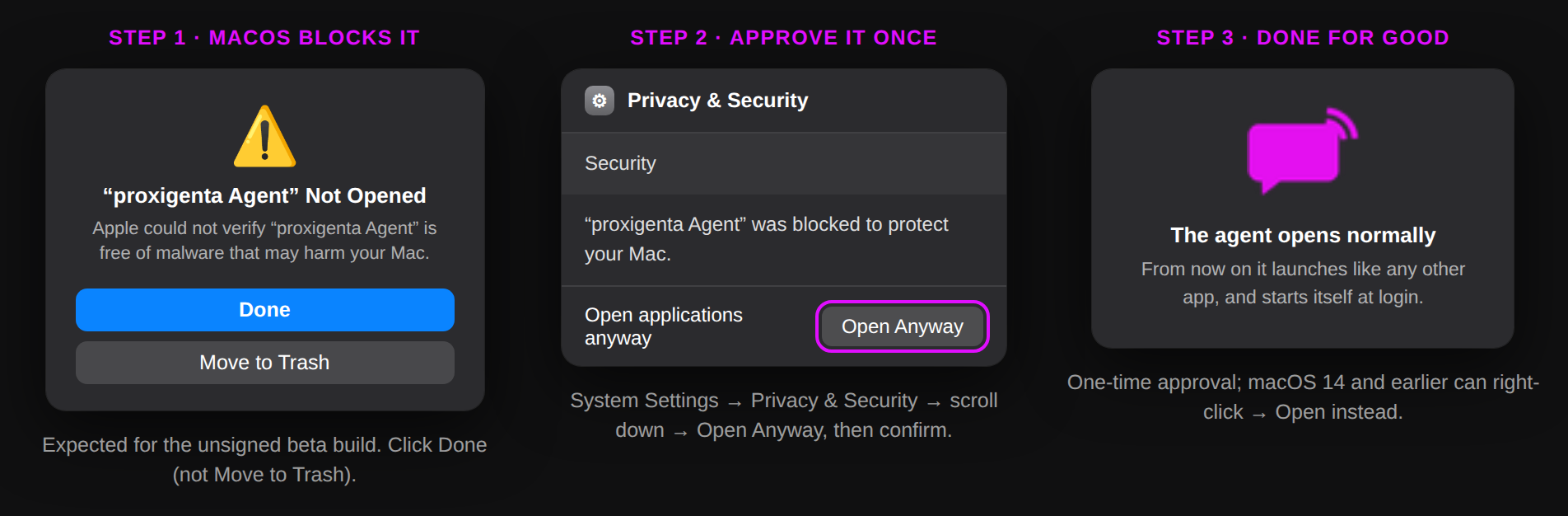
- The first time only: double-click the app; macOS will block it because the beta build is not yet notarized by Apple. Open System Settings, go to Privacy & Security, scroll down, and click Open Anyway next to proxigenta Agent, then confirm. On macOS 14 and earlier you can right-click the app and choose Open instead. Either way it is needed once; afterwards it opens normally.
- Enter the one-time enrollment code from Devices, then Add a device.
The Mac agent installs itself as a login item, so it starts automatically after restarts. Its menu bar icon shows your connection status, a Ping Now button, Prevent Sleep, Ghost mode, and Hyper Mode.
Windows
- In settings, open Devices and click Download for Windows (use the Windows arm64 link for Arm machines such as Surface Pro X and Copilot+ laptops; everything else is x64).
- Unzip and run ProxigentaAgent.exe. If SmartScreen objects to the unsigned beta build, click More info, then Run anyway. That approval is needed once.
- Enter your enrollment code when prompted. The agent lives in the system tray with the same status menu as the Mac version and starts automatically at login.
Linux
- In settings, open Devices and click Download for Linux (amd64, or the arm64 link for Raspberry Pi and other Arm machines).
- Make it executable, enroll with the code from Devices → Add a device, then install the service:
chmod +x proxigenta-agent-linux-amd64./proxigenta-agent-linux-amd64 enroll YOUR-CODE./proxigenta-agent-linux-amd64 install installsets up a systemd user service so check-ins start at login and survive reboots.proxigenta-agent statusshows monitoring state and, during an outage, the countdown and predicted backend timeline;ghost,hyper,prevent-sleep, andupdatework from the same command.
On every platform the agent is deliberately minimal: it sends a heartbeat, battery and power state, and optional items you turn on (coarse region, calendar busy blocks). Nothing else leaves your machine.