Signing in with magic links
No passwords: enter your email, click the one-time link we send, and you are signed in for 7 days.
Proxigenta has no passwords to steal or forget. Enter your email on the sign-in page and we send a one-time link; clicking it signs you in on that browser for 7 days.
Reading email on a different device than the one you are signing in on? Open the link anywhere: it shows a choice page asking where to sign in. Choose “Approve” and the device that requested the link signs in by itself within a few seconds; choose “Sign in here” to use the device you clicked on instead. Handy when the sign-in email lives on your work laptop but you are signing in on your phone.
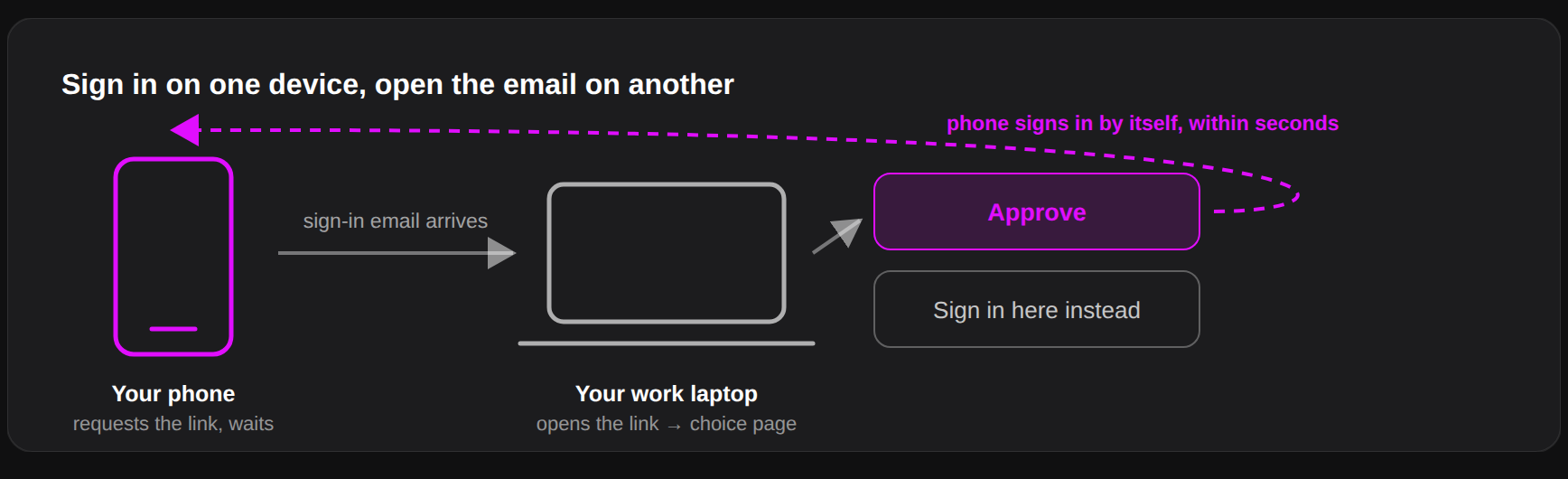
Details worth knowing:
- Links are single use and expire quickly; if one has expired, just request another. Simply opening a link consumes nothing — only choosing an option does — so a mail scanner can never burn it.
- Sign-in requests are rate limited to prevent abuse; if you hit the limit, wait a bit and retry.
- Sessions can be revoked everywhere at once: Account, then Sign out everywhere. Use it if you lose a device.
- During the closed beta, new accounts are created with an invite code from the sign-in page.
If the email does not arrive within a minute, check spam and confirm you typed the address your account is registered under: for security, the page shows the same message whether or not an account exists.